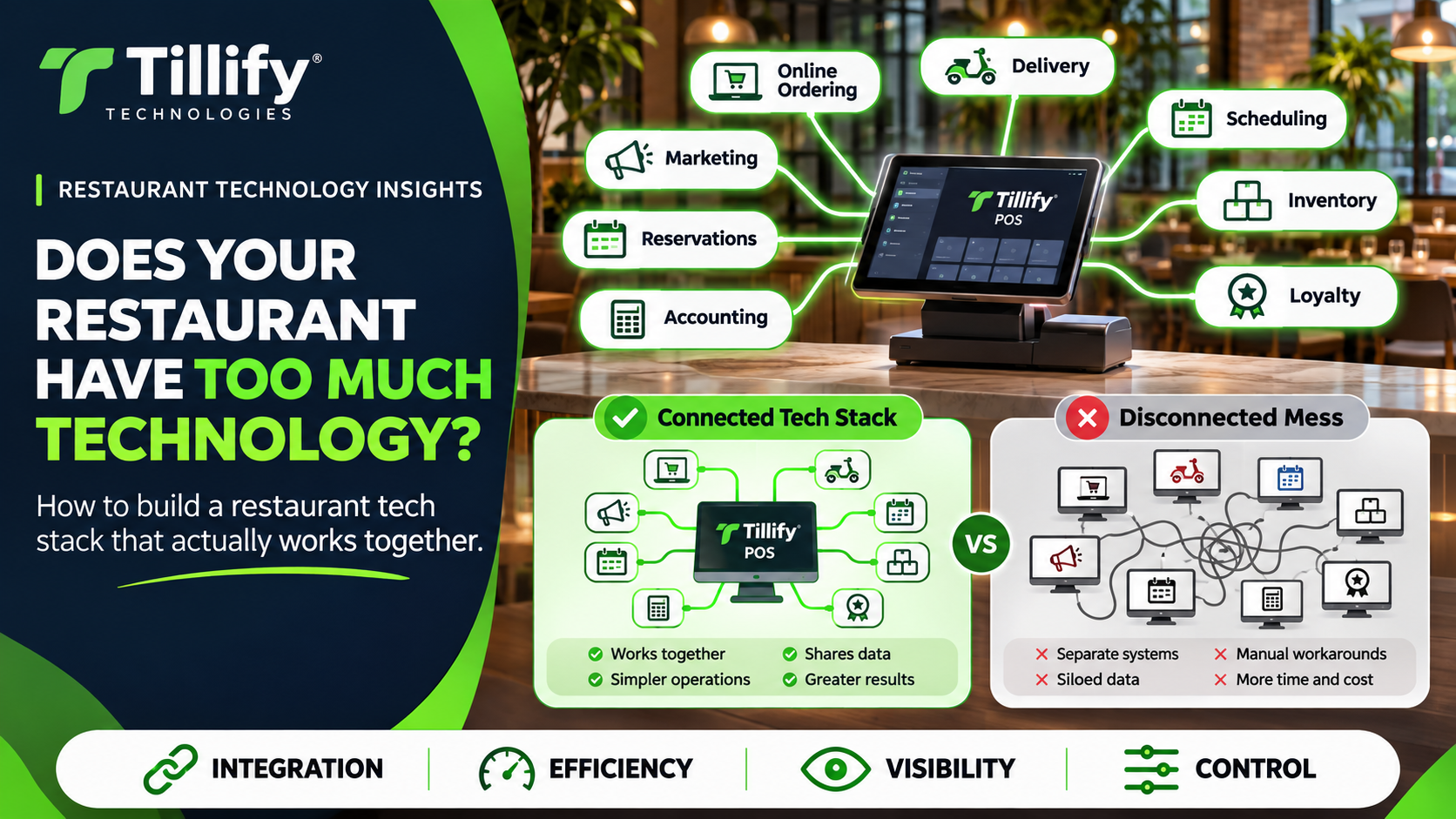
Restaurants have more technology access than ever.
A point-of-sale system may be only the beginning.
Add online ordering.
Delivery.
Reservations.
Scheduling.
Payroll.
Inventory.
Loyalty.
Gift cards.
Marketing.
Accounting.
Kitchen displays.
Guest Wi-Fi.
Security cameras.
Business intelligence.
Suddenly, the restaurant has fifteen different systems, each promising to make operations easier.
And sometimes they do.
But adding more technology does not automatically create a better restaurant.
At a certain point, the technology that’s supposed to simplify operations can start creating its own workload.
More subscriptions.
More passwords.
More integrations.
More vendors.
More places where information can fail to synchronize.
The goal shouldn’t be to build the biggest restaurant technology stack.
It should be to build one that actually works together.
Start With the Problem, Not the Product
A new restaurant technology platform often begins with an appealing feature.
Maybe it’s advanced inventory.
Automated marketing.
Better scheduling.
A new loyalty program.
Before adding it, ask:
What problem are we trying to solve?
Be specific.
Instead of:
“We need better technology.”
try:
“Managers spend three hours every Monday manually entering POS sales into accounting.”
or:
“Employees are entering delivery orders into the POS by hand.”
or:
“We don’t know which menu items are actually profitable.”
Specific problems make technology easier to evaluate.
If you can’t clearly explain what a new system should improve, you may not need another system.
Your POS Should Be the Starting Point
For most restaurants, the POS sits at the center of the technology environment.
It already knows a lot about the operation.
It may contain:
- Sales
- Menu items
- Employees
- Payments
- Order channels
- Guest information
- Discounts
- Taxes
- Location information
Before buying another platform, find out what your POS already does.
You may discover that functionality such as online ordering, loyalty, scheduling, reporting, or marketing is already available.
That doesn’t automatically mean the POS-native option is the best choice.
But you should understand what you’re already paying for before adding another subscription.
Native Features vs. Third-Party Integrations
Restaurants generally have two choices when adding functionality.
Use a feature built into the POS, or connect a specialized third-party platform.
Both approaches can make sense.
POS-native tools may offer:
- Easier setup
- Fewer vendors
- Shared data
- Simpler support
- One login
- Fewer integration points
Third-party tools may offer:
- More advanced functionality
- Better specialization
- Broader reporting
- Features unavailable in the POS
- Flexibility across multiple platforms
The question isn’t whether native or third-party is always better.
It’s whether the third-party system's extra capability justifies the added complexity.
An Integration Isn’t Automatically a Good Integration
A provider saying:
“Yes, we integrate with your POS.”
is only the beginning.
Ask what the integration actually does.
Does it send information one way or both ways?
How often does it synchronize?
What data is shared?
Who owns the mapping?
What happens if an item name changes?
How are refunds handled?
What happens when the integration goes offline?
For example, an online ordering platform may technically integrate with your POS while still requiring employees to manage menus separately.
That’s very different from a system that automatically synchronizes menu items, pricing, availability, modifiers, and orders.
The word integration can describe very different levels of connectivity.
Watch for Duplicate Data Entry
One of the clearest signs of a weak technology stack is employees entering the same information in multiple places.
Examples include:
- Updating menu pricing in several systems
- Entering online orders manually into the POS
- Copying sales totals into accounting
- Entering new employees separately into multiple platforms
- Updating operating hours across several services
- Re-entering inventory counts
Every duplicate step creates another opportunity for error.
It also costs employee time.
When evaluating technology, ask:
What manual work does this eliminate?
If the answer is “not much,” the technology may add complexity instead of removing it.
Count the Subscriptions
Individual restaurant software subscriptions often don’t look particularly expensive.
$50 here.
$99 there.
$150 somewhere else.
Restaurants can accumulate a surprising amount of recurring technology expense.
Take inventory of every monthly technology cost.
Include:
- POS software
- Online ordering
- Delivery
- Scheduling
- Payroll
- Inventory
- Loyalty
- Marketing
- Reservations
- Accounting integrations
- Reporting
- Network management
- Website tools
Then ask whether each platform is still providing enough value to justify the cost.
A system that made sense two years ago may now overlap with functionality available somewhere else.
Count the Vendors Too
Cost isn’t the only concern.
Every additional vendor creates another support relationship.
When something breaks, you may hear:
“That’s a POS problem.”
Then the POS provider says:
“That’s an integration problem.”
Then the integration provider says:
“Everything looks good on our side.”
Meanwhile, the restaurant wants orders to work.
The more systems involved in a workflow, the more important it becomes to understand who is responsible for each piece.
Document your vendors and what they support.
It makes troubleshooting much easier.
Too Many Tablets Are Usually a Clue
Restaurant counters became infamous for collections of delivery tablets.
One for each marketplace.
Another for reservations.
Another for online ordering.
Another for something nobody remembers installing.
Modern integrations have reduced this problem, but the principle remains useful.
If employees have to monitor several disconnected devices to run the restaurant constantly, your technology probably isn’t working together as well as it could.
The goal should be to reduce operational touchpoints whenever practical.
Consider the Employee Experience
Owners, managers, or corporate teams often make restaurant technology decisions.
Employees use the systems all day.
A server may need to interact with:
- POS
- Handheld
- Scheduling app
- Tip platform
- Training system
- Employee communication app
A manager may have several more.
Every system adds:
- Another login
- Another workflow
- Another training requirement
- Another potential support issue
Ask employees what they actually use.
You may discover that some tools are extremely valuable, while others may be ignored almost entirely.
Think About the Guest Experience Too
Technology should also make things easier for guests.
Instead, restaurants sometimes create a fragmented customer experience.
A guest may have:
- One account for online ordering
- Another loyalty account
- A separate gift-card system
- Different ordering experiences by location
- Rewards that don’t apply through delivery
- Different menus across platforms
Behind the scenes, those may be separate systems.
To the guest, it’s your restaurant.
Your technology stack should support a reasonably consistent customer experience.
Pay Attention to Data Ownership
Restaurant technology generates valuable information.
Before adopting a platform, understand what happens to that data.
Ask:
- Can you export it?
- In what format?
- What happens if you cancel?
- Does data transfer back into the POS?
- Is customer information shared between systems?
- Who controls customer records?
You don’t want critical restaurant information trapped inside a platform you can no longer access after ending the service.
More Connections Mean More Security Considerations
Every integration creates another relationship between systems.
That doesn’t mean integrations are inherently unsafe.
It does mean you should understand what each one can access.
A scheduling system may need employee information.
An accounting integration may need sales data.
An online ordering platform may need your menu and transaction information.
Review integrations periodically.
Remove connections for services you no longer use.
Don’t leave old systems connected simply because nobody remembered they were there.
Build Around a Source of Truth
Restaurants often run into problems when multiple systems all believe they own the same information.
Take menu pricing.
Where should the official price live?
The POS?
Online ordering?
A menu-management platform?
A spreadsheet?
Ideally, one system should serve as the primary source and other systems should receive information from it.
The same principle applies to:
- Employee information
- Menu items
- Pricing
- Sales
- Customer information
Clear ownership reduces inconsistencies.
Review Your Technology Stack Once or Twice a Year
Restaurant technology shouldn’t be something you only review when you’re buying a new POS.
Periodically inventory what you’re using.
Create a list with:
System
Purpose
Monthly Cost
Owner
Integrates With
Still Needed?
Then review it.
You may find:
- Duplicate functionality
- Unused subscriptions
- Old integrations
- Systems nobody owns
- Features available in platforms you already have
- Manual processes that could be automated
A simple review can uncover major opportunities to simplify operations.
Signs Your Restaurant May Have Too Much Technology
Watch for patterns like:
- Employees entering the same data more than once
- Menus that regularly differ between platforms
- Numerous unused logins
- Several systems doing similar things
- Managers unsure which system owns what information
- Frequent integration failures
- Too many vendors involved in basic workflows
- Software nobody remembers why you’re paying for
- Employees avoiding certain systems because they’re too complicated
Technology should reduce operational friction.
If managing the technology itself becomes a major source of friction, something needs to change.
Don’t Simplify Just for the Sake of Simplifying
This doesn’t mean restaurants should try to run everything through one platform.
Specialized technology can be incredibly valuable.
A dedicated inventory platform may be far more capable than the inventory feature included in a POS.
A specialized reservation system may be essential to the guest experience.
The objective isn’t:
Use fewer systems at all costs.
It’s:
Use the systems that provide enough value to justify their cost and complexity.
Sometimes that means one integrated platform.
Sometimes it means several best-in-class systems.
The right answer depends on your restaurant.
The Bottom Line
Restaurant technology should work like an ecosystem.
Your POS, online ordering, payments, accounting, scheduling, inventory, marketing, and other systems should support the operation, not create another operation to manage.
Before adding a new platform, ask:
What problem does it solve?
What does it replace?
What does it integrate with?
What manual work does it eliminate?
What will it cost?
Who will support it?
And periodically ask an equally important question:
Do we still need it?
The smartest restaurant technology stack isn’t the one with the most software.
It’s the one where every piece has a purpose.
Is Your Restaurant Technology Getting Complicated?
Tillify Technologies helps restaurants review their entire technology environment, not just the POS terminal.
From point-of-sale systems and integrations to networking, menu configuration, installation, and ongoing support, we help restaurants identify where they can simplify, improve, or better connect their technology.
Restaurant technology should make the operation easier. If managing the technology has become its own job, it’s time to take another look.
Comments