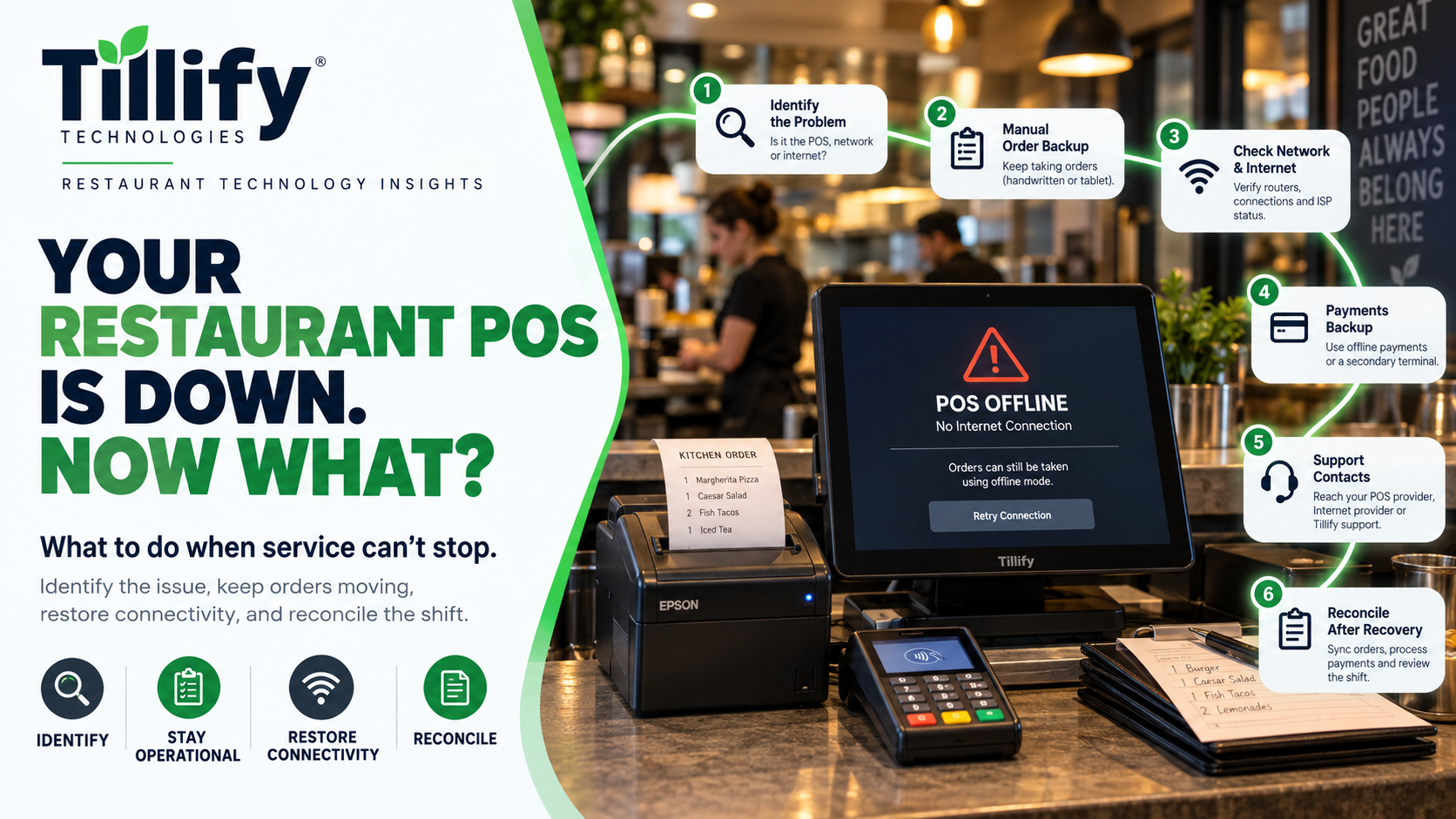
It usually happens at the worst possible time.
The dining room is full.
The ticket rail is overflowing.
Online orders are coming in.
And suddenly someone says:
“The POS is down!”
That sentence can mean many different things.
Maybe one terminal froze.
Maybe the internet went out.
Maybe handhelds lost Wi-Fi.
Maybe the payment processor stopped responding.
Maybe the kitchen printer disappeared.
Maybe the entire POS platform is down.
Those are very different problems, even though they can all look like a POS failure to the restaurant.
The first goal during an outage is not to unplug everything immediately.
It is to figure out what is actually broken while keeping the restaurant operating as smoothly as possible.
Here is a practical way to approach it.
1. Determine How Big the Problem Is
Start by answering one question:
What still works?
Check whether:
- One terminal is down or all of them.
- Handhelds still connect.
- Kitchen printers still print.
- Kitchen displays still receive orders.
- Credit cards still process.
- Online orders are still arriving.
- Back-office access still works.
- Other internet-connected devices are online.
This helps narrow the problem quickly.
If one terminal has stopped responding but everything else works, you probably do not have a restaurant-wide outage.
If every cloud-connected system suddenly stopped working, the internet connection becomes a much stronger suspect.
Understanding the scope prevents unnecessary troubleshooting.
2. Don't Automatically Blame the POS
The POS is the most visible piece of restaurant technology, so it often gets blamed for everything.
But several systems sit underneath or around it.
A failure could involve:
- Internet service
- Local network
- Wi-Fi
- Network switches
- POS software
- POS hardware
- Payment processor
- Payment terminal
- Printer
- Kitchen display
- Third-party integration
If a printer stops receiving orders, replacing the POS terminal probably will not help if the actual problem is the network connection to the printer.
Likewise, a perfectly functioning POS may appear broken if it cannot reach the cloud because your internet provider is down.
Treat the POS environment as a system, not a single device.
3. Check the Internet and Local Network Separately
Restaurants often treat Wi-Fi, networking, and internet service as the same.
They are not.
Your restaurant can have:
Working Wi-Fi but no internet
or
Working internet but a local network problem
or
A Wi-Fi issue affecting only certain devices
A quick test can help.
Can a wired device reach the internet?
Can a phone connected to the restaurant's Wi-Fi load a website?
Are network-connected printers still reachable?
Do devices in one part of the restaurant work while devices somewhere else do not?
Those clues help determine whether the problem is external internet service or something inside the building.
4. Know What Your POS Can Do Offline
Restaurants should learn this before an outage happens.
Different POS platforms handle connectivity loss differently.
Some can continue:
- Entering orders
- Sending orders locally
- Opening checks
- Printing tickets
- Storing certain transactions
Other functionality may become unavailable.
That can include:
- Cloud reporting
- Online ordering
- KDS Screens
- Terminal order syncing
- Gift cards
- Loyalty
- Remote access
- Some integrations
- Credit-card authorization
Your team should know which functions remain available and which do not.
An outage becomes much easier to manage when employees already understand how the system behaves offline.
5. Be Careful With Offline Credit-Card Transactions
Many POS systems offer some form of offline payment capability.
That can be extremely useful.
It also carries risk.
When a transaction is accepted offline, the restaurant may not know immediately whether the card will ultimately be approved. Depending on the system and processor, you may be accepting transactions that are stored and submitted later.
Restaurants should understand:
- Whether offline payments are supported.
- Whether there are transaction limits.
- How long transactions can remain offline.
- When transactions are uploaded.
- Who assumes the risk if the card is declined later. (almost always the restaurant)
Managers should know the restaurant's policy before they have to decide in the middle of service.
6. Have a Manual Order Backup
Technology can fail.
Your restaurant still needs a way to communicate orders.
That does not mean every restaurant needs a complicated disaster-recovery binder.
A simple backup process can go a long way.
Keep supplies such as:
- Order pads
- Pens
- Manual guest checks
- Calculator
- Printed menu pricing
- Manager contact information
Then establish how orders will move from front of house to kitchen if the POS cannot send them.
For example:
Server writes order → kitchen receives handwritten ticket → check is reconciled later.
This process will not be as efficient as the POS.
It does not need to be.
It needs to keep the restaurant functioning temporarily.
7. Establish a Payment Backup Plan
Orders are only part of the problem.
The restaurant still needs to get paid.
Your backup options depend on your technology and processing environment.
Possible approaches may include:
- POS offline payments
- Secondary internet connection
- Cellular-enabled payment device
- Alternate approved payment terminal
- Cash
The important part is deciding what your restaurant will do before the primary payment method becomes unavailable.
Do not improvise payment practices that create security or compliance problems.
8. Avoid Restarting Everything at Once
Restarting equipment is a common troubleshooting step.
Sometimes it works.
But indiscriminately rebooting the entire technology stack can make diagnosis harder.
If one printer is offline, there may be no reason to reboot:
- Every terminal
- Network switches
- Router
- Payment devices
- Kitchen displays
Change one thing at a time when possible.
That way, if the problem resolves, you have a better idea of what actually fixed it.
It also reduces the chance of turning a small problem into a larger outage.
9. Document What Happened
During a busy shift, documentation is probably not the priority.
Once things stabilize, write down what happened.
Capture:
- Time the problem started.
- Devices affected.
- What continued working.
- Error messages.
- Troubleshooting steps.
- Which vendor was contacted.
- What fixed the problem.
- Time service returned to normal.
This information becomes extremely useful if the problem happens again.
Instead of starting from zero, you have a record.
Recurring outages are often much easier to identify when you can compare previous incidents.
10. Know Who Supports What
One of the most frustrating parts of restaurant technology problems is figuring out who to call.
The POS company may support the software.
A different company may provide the internet.
Someone else may manage the network.
The payment processor may own the payment devices.
A third party may handle online ordering.
Before something goes wrong, create a basic support list.
Include:
- POS support
- Internet provider
- Network support
- Payment processor
- Online-ordering provider
- Delivery integration provider
- Hardware provider
- Internal manager or technology contact
Managers should be able to find this information quickly.
They should not have to search through someone's inbox while the restaurant is offline.
11. Consider Backup Internet
For restaurants heavily dependent on cloud technology, a secondary internet connection may be worthwhile.
That might involve:
- A second wired provider
- Cellular backup
- Automatic failover equipment
The right setup depends on the restaurant.
But one important point is often missed:
Backup internet is only useful if it actually takes over when the primary connection fails.
Test it.
Don't wait until an outage to discover the backup connection was never configured correctly.
12. Test Your Outage Plan
Restaurants run fire drills.
Technology deserves at least a small version of the same idea.
Ask your management team:
What would we do if the POS stopped working right now?
Do they know:
- How to identify whether the internet is down?
- Whether offline ordering works?
- How offline payments behave?
- How to contact support?
- Where manual checks are kept?
- How to communicate orders to the kitchen?
- Whether backup internet exists?
- How to reconnect once service returns?
If nobody knows the answers, the restaurant likely doesn't have an outage plan.
13. Don't Forget Recovery
When the system comes back online, the incident is not necessarily over.
You may need to verify:
- Offline payments uploaded.
- Orders were closed correctly.
- Online orders resumed.
- Printers reconnected.
- Kitchen displays synchronized.
- Gift-card or loyalty transactions processed.
- Reports match expected sales.
- Cash and card totals reconcile.
This is particularly important when transactions were handled manually or offline.
A few minutes of verification can prevent the outage from creating accounting problems later.
What If the POS Keeps Going Down?
An occasional outage does not necessarily indicate a serious problem.
Repeated outages are different.
If your restaurant frequently experiences:
- Terminal disconnects
- Printer failures
- Wi-Fi dead zones
- Slow transactions
- Payment interruptions
- Internet failures
- Required reboots
Do not normalize them. An underlying cause is probably worth identifying. It could be the POS. Aging hardware or network infrastructure. It could be an internet provider or a configuration issue.
The important part is finding the cause rather than repeatedly treating the symptom.
The Bottom Line
A POS outage is stressful because restaurant operations are increasingly dependent on connected technology.
The best response is preparation.
Know what your system can do offline.
Understand your network.
Have a manual ordering process.
Know your payment options.
Keep support contacts accessible.
And document recurring problems.
Most importantly, do not assume every technology failure is a POS failure.
When you understand how the systems around your POS work together, outages become easier to diagnose and less disruptive.
Is Your Restaurant Dealing With Recurring POS Problems?
Tillify Technologies helps restaurants troubleshoot point-of-sale systems and the technology surrounding them.
That can include POS configuration, hardware, networking, connectivity, installation, integrations, and ongoing system maintenance.
Sometimes the solution is replacing equipment.
Sometimes it is adjusting the configuration.
And sometimes the POS was never the problem in the first place.
Find the problem before you replace the solution.
Comments